Chapter Title Generator
Pick a genre and a style, add a word from your chapter if you like, and get a list of chapter title ideas.
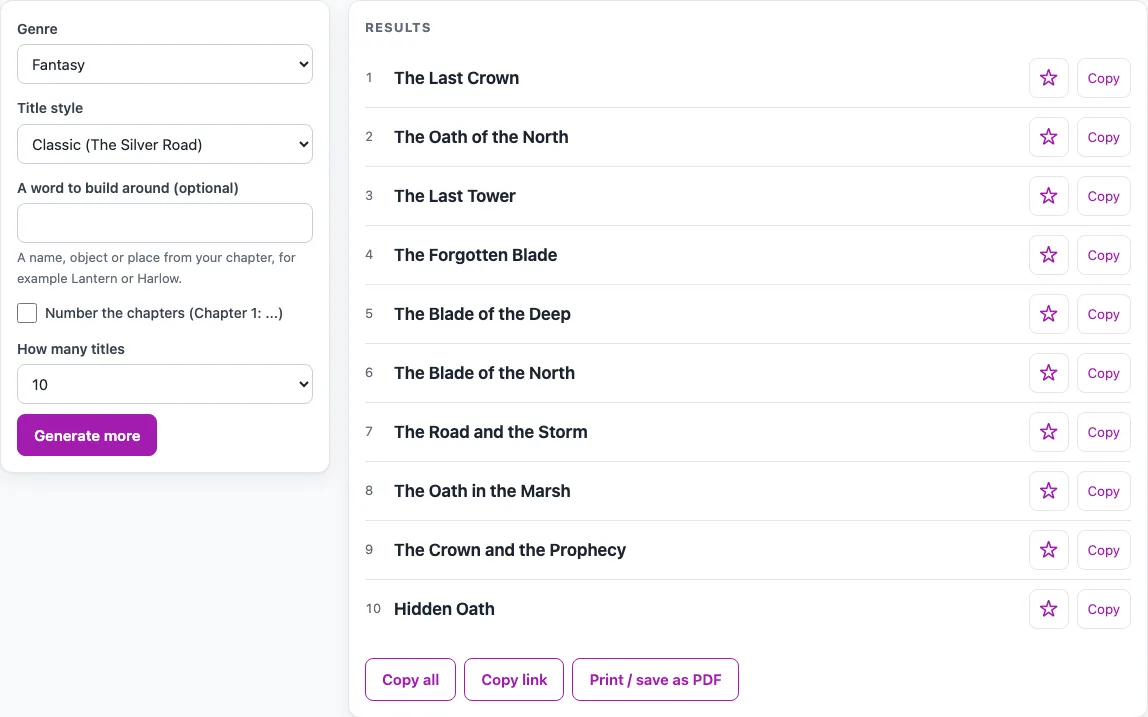
How to use the Chapter Title Generator
- Open the Genre menu and choose the category closest to your book: Fantasy, Mystery and crime, Romance, Science fiction, Horror, Non-fiction and self-help, or Children’s book.
- Choose a Title style: Classic (for example, The Silver Road), Short and punchy (for example, Embers), or Intriguing (for example, What the Witch Knew).
- Optionally, type a word from your chapter into the word box, such as a name, object or place. The box accepts up to 24 letters, numbers, spaces, apostrophes and hyphens. Other symbols are removed.
- Tick Number the chapters if you want each title to start with “Chapter 1:”, “Chapter 2:” and so on.
- Pick How many titles: 10 or 20.
- Read the list. It refreshes as soon as you change any option.
- Click Copy beside a single title, or Copy all to copy the whole list.
Click Generate more for a new list with the same settings. To keep titles you like, click the star beside a name to add it to My shortlist under the results. The shortlist is kept only until you close the page, and Copy shortlist copies it. Copy link copies a page address that reproduces the same list, and Print / save as PDF prints the list.
How do I write a good chapter title?
A good chapter title names something that happens or matters in that chapter, and it makes the reader want to keep going. Start with the chapter itself: find the object, person or place that drives the scene, and use that word as your anchor. This is the same idea behind the word box, where your word replaces the noun in about three out of four generated titles.
Then adapt the result. Generated titles are built from patterns, usually an adjective, a noun, a person such as “the Vicar” and a place such as “the Library”, filled in with genre words. They are suggestions, so read your chapter and change any word that does not fit. A title like “The Last Lantern” becomes accurate once the lantern is the thing the chapter turns on.
Keep small words such as of, the and in in lower case, as the tool does. Be careful with titles that give away the chapter’s twist, and check that the title matches the tone of the scene as well as its events.
Should chapter titles be short or long?
There is no fixed rule, and the right length depends on the style you want. Short and punchy titles, such as “Letter”, “Alibi” or “Embers”, are quick to scan and suit fast-moving scenes. Classic titles, such as “The Locked Letter” or “The Letter of Blackwood Manor”, run longer and sound more formal. Intriguing titles, such as “Three Days Until the Portrait” or “Everything Changes at Harbor Street”, are often the longest and hint at a question or a deadline.
You can mix styles, but one style for the whole book keeps the chapters consistent. If a long title feels clumsy when you read it aloud, shorten it.
Do chapters need titles at all?
No, chapters do not need titles. A book can number its chapters only. Titles are a choice: they can set a mood, signal a turn in the story, or help a reader find a section in a non-fiction book.
If you use titles, each one should earn its place. A title that only repeats the chapter number adds nothing, so leave it out or make it more specific.
Frequently asked questions
Can I use the generated titles in a book I sell?
Yes. Generated results can be used anywhere, including in books, games and products you sell, with no credit needed. Titles are generally not protected by copyright, but they may be protected under trademark law in some circumstances. Some generated names can match a real person, place or existing work by chance, so search before you use one commercially.
Why does the list change when I change an option?
The list refreshes as soon as you change any option, so you always see titles that match your current settings. To get a different set of titles with the same settings, click Generate more. To share the exact list you are looking at, use Copy link.
Will a single list ever contain the same title twice?
No. Every list is checked for duplicates, ignoring capital letters, so no title appears twice in the same list.
What can I type in the word box?
You can type up to 24 letters, numbers, spaces, apostrophes and hyphens. Other symbols are removed when the list is made. A name such as O’Brien or Mary-Jane works, but a word with a symbol such as an ampersand will have that symbol removed.
Related tools
- Book Title Generator: use this when you need a title for the whole book rather than for each chapter.
- First Line Generator: use this when you are starting a chapter and need an opening sentence to go with its title.
- Average Novel Length: use this when you are planning how long your book will be.
- DnD Name Generator: use this when you need names for characters, places or items in a fantasy game or story.