EPUB Metadata Editor
Open an EPUB, change its title, authors, language, publisher, description, subjects, date, series or cover, and save a new .epub. The original is untouched and nothing is uploaded.
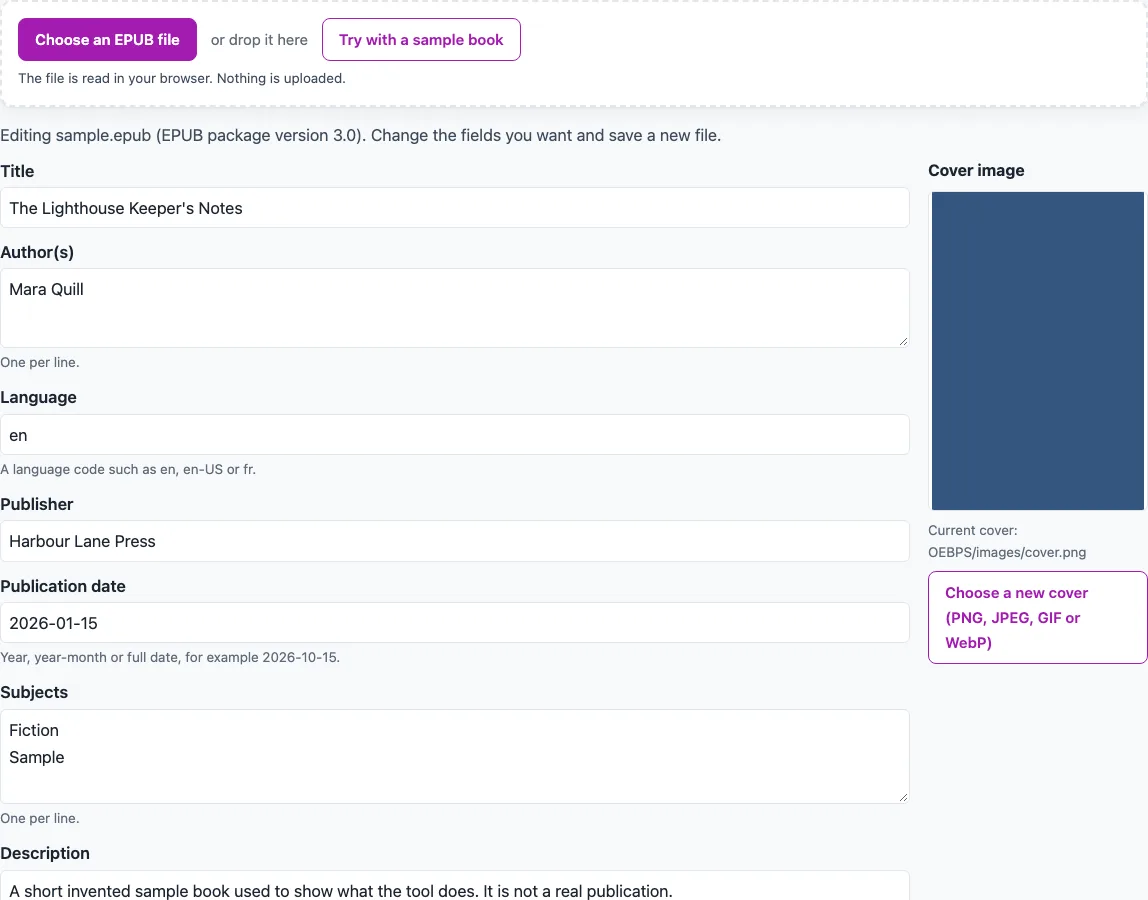
How to use the EPUB metadata editor
- Click “Try with a sample book” to try every field on a built-in invented book with a series, or choose your own EPUB file.
- Edit the form. “Title”, “Language” and “Unique identifier” cannot be empty. Use a language code such as en or fr-CA.
- Enter “Author(s)” and “Subjects” one per line.
- Enter “Publication date” as 2026, 2026-10, or 2026-10-15. Publisher, description, subjects and date can be cleared, which removes their elements from the book.
- Fill “Series” and “Book number” if the book has a series. Use a number such as 2 or 1.5. These fields are disabled for EPUB 2 books.
- If you edit the identifier, the tool shows a warning, because readers and stores may treat the file as a different book. It cannot be changed if the book has obfuscated fonts.
- To replace the cover, use “Choose a new cover (PNG, JPEG, GIF or WebP)”. The current cover is shown first.
- Click “Save as new EPUB”. You get
<original>-edited.epub.
If you change nothing, the tool says there is nothing to save. Your original file stays as it was. After saving, the page lists the changed fields and notes that the modified date was updated. Files over 100 MB get a memory warning.
What does an EPUB metadata editor actually change?
An EPUB metadata editor changes the package document, the .opf file inside the book, and nothing else in the content. The edits are made as text, in place. Only the elements you edited change, and the rest of the OPF, including its indentation, stays as written. Every other file is copied unchanged, in the original order, with the mimetype file first and stored.
Why does the modified date change when you save?
For an EPUB 3 book, the modified date (dcterms:modified) is set to the time of saving. It is written as a UTC date-time without fractions, in the form CCYY-MM-DDThh:mm:ssZ. EPUB 3.3 §5.5.5 requires exactly one such value. EPUB 2 books get no dcterms:modified added.
Why can some books not have their identifier changed?
A book with obfuscated fonts cannot have its identifier changed, because the font keys are derived from the unique identifier (EPUB 3.3 §4.4). In other books, changing the identifier is allowed but shows a warning. Readers and stores may treat the file as a different book and lose reading progress or library matches. If the NCX file repeats the old identifier as dtb:uid, the tool updates it to the new one.
How are series and book numbers stored in an EPUB 3 file?
The tool writes the series as an EPUB 3 collection. It uses a belongs-to-collection meta (appendix D.3.3), with collection-type set to series (D.3.4). The book number goes in an optional group-position (D.3.7). EPUB 2 has no standard series field, so the series fields are disabled for EPUB 2 books.
What happens when you replace a cover?
The current cover is found by the cover-image property or the legacy cover meta. If the new image has the same type, it replaces the file. If it has a different type, the file is renamed to the new extension, and its manifest href and media-type are updated. References to it in the chapter (XHTML) files are rewritten. CSS files are not scanned, so a CSS reference to the old name would not be changed. If the book has no cover, the image is added as images/cover.
Which books and files are refused?
Books with DRM are refused with a clear message. DRM means anything listed in META-INF/encryption.xml other than font obfuscation. A file that is not a ZIP, or that has no container.xml or package document, gets a plain error message. Title, language, and identifier are required (EPUB 3.3 §5.5.3.1), so they cannot be emptied. For checking the book’s structure, use the validator page.
Frequently asked questions
Is my EPUB file uploaded when I edit it?
No. Everything runs in your browser, and nothing is uploaded. Your original file is never changed. You get a new file named <original>-edited.epub.
Can I use this to edit the chapter text of my book?
No. The tool changes metadata only. It does not change chapter text, the table of contents, styles, or fonts.
Does this tool check whether my EPUB is valid?
No. It edits fields and saves a copy, but it does not check the book. For a structure check, use the EPUB Validator.
Why are the series fields disabled for my book?
The book is an EPUB 2 file. EPUB 2 has no standard series field, so series name and book number are disabled. The other fields can still be edited.
Why does the tool say there is nothing to save?
You have not changed any field. The tool only produces a new file when at least one edit has been made.
Are author sort names edited with this tool?
No. Author sort names (file-as) are not edited. If you rename an author who has one, the tool tells you the old sort name was kept. If you remove an author, the meta elements that refine that author are removed too.
Related tools
- EPUB reader online: open an EPUB in your browser to read it before or after you edit its details.
- EPUB to Kindle: convert an EPUB to a Kindle-friendly format when you need one for a Kindle device.
- EPUB to text: pull the plain text out of an EPUB when you need the words without the layout.
- EPUB Validator: check the structure of an EPUB after you have made changes to it.
- HTML to EPUB: turn HTML pages into an EPUB file when you start from web content.
- PNG to EPUB Converter: build an EPUB from PNG images when your book is made of pictures.
- TXT to EPUB: turn a plain text file into an EPUB when you start from a .txt file.
- Word to EPUB: turn a Word document into an EPUB when your manuscript is in Word.