EPUB to Kindle
Open your EPUB (or try the sample) to check its size, version, DRM and metadata against the Send to Kindle and KDP rules Amazon's pages state; no MOBI conversion is offered.
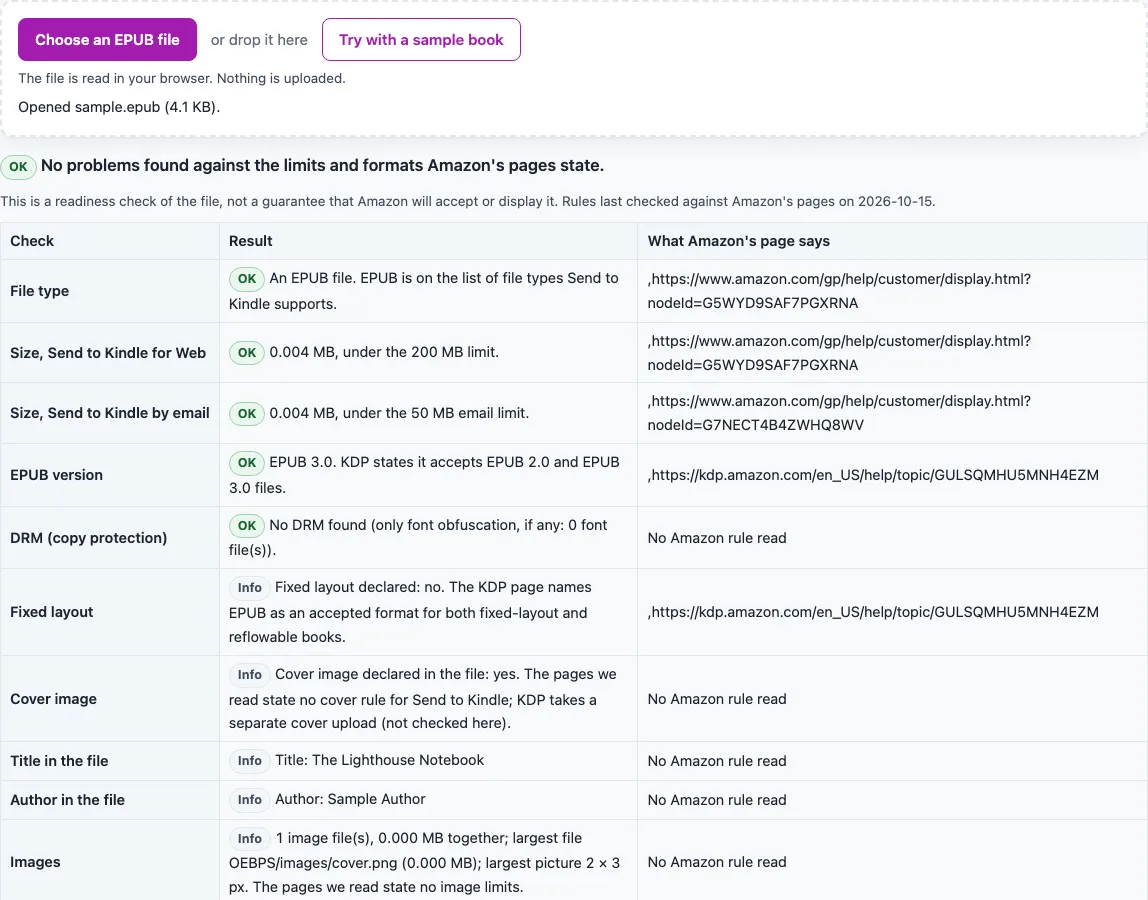
How to use the EPUB to Kindle check
- The sample book is checked on load, so a report is already shown. Select “Try with a sample book” to repeat it.
- Choose your own EPUB file to replace the sample report.
- The file is read in your browser and is not uploaded.
- Read the file type row. EPUB is marked as supported.
- Read the two size rows. The web limit is 200 MB and the email limit is 50 MB. A pass means the file is under the limit. A warning means it falls in the grey zone Amazon does not define, and a fail means it is over.
- Read the EPUB version row. Versions 2.0 and 3.0 pass. Any other version gets a warning.
- Read the DRM row. If DRM is detected, the verdict is “DRM” and only the size, version and metadata rows are reported.
- Check the title and author rows. A warning appears if either is missing.
- Review the info rows for fixed layout, cover, and images (count, total size, largest file and largest picture in pixels). These are shown for information only.
- Read the verdict. It is one of “no problems found”, “no failures but items to look at”, “N problems”, or “DRM”.
- Select “Download the report (.txt)”. It lists each check, its result and the source URL.
Every check, the report and the verdict appear on the same page, so you can re-run the check after you edit your file.
Can this tool convert EPUB to Kindle format?
No. The tool checks an EPUB file and does not create a new one, because MOBI, AZW3 and KFX cannot be written honestly in a browser tab. Amazon’s publishing platform also no longer accepts MOBI. KDP stopped accepting MOBI for reflowable books on August 1, 2021, and for fixed-layout books and all new uploads on March 18, 2025. For eBooks, KDP names EPUB, DOCX or KPF. Existing published books are not affected unless they are updated.
What rules does the EPUB to Kindle check use?
The check uses the rules on three Amazon pages, read on 15 October 2026. Send to Kindle lists EPUB among its supported file types. Send to Kindle for Web accepts documents of 200 MB or smaller. Send to Kindle by email takes a total of 50 MB or less and up to 25 attachments per email, and a ZIP can carry more. The KDP page accepts EPUB 2.0 and EPUB 3.0 files.
Amazon’s own help pages returned HTTP 503 on that date, so the two Send to Kindle articles were read through the mirror host digprjsurvey.amazon.com using the same article ids. The KDP page was read directly. The web and email limits differ, and the check reports each one separately.
How does the check handle MB limits and DRM?
Amazon does not say whether “MB” means 1,000,000 or 1,048,576 bytes. The check therefore uses a grey zone. A file under 200,000,000 bytes passes. A file from 200,000,000 to 209,715,200 bytes gets a warning that says so. A larger file fails. The same rule applies to the 50 MB email limit, using 50,000,000 and 52,428,800 bytes.
A file counts as DRM-protected when META-INF/encryption.xml lists a resource with an algorithm other than the two font-obfuscation algorithms, or when META-INF/rights.xml or sinf.xml exists. Amazon’s pages state no DRM rule, so the check says so. It is also not EPUBCheck: it does not validate the full structure of the file, and files over 100 MB get a size warning.
Sources (checked 15 October 2026): amazon.com · digprjsurvey.amazon.com · kdp.amazon.com · w3.org
Frequently asked questions
Does this page turn an EPUB into a MOBI file?
No. It only checks the file. MOBI, AZW3 and KFX are not produced here, and KDP no longer accepts MOBI uploads.
Will Amazon accept my file if the verdict says “no problems found”?
Not necessarily. The verdict means the file passes the limits and formats that Amazon’s pages state. Amazon may still reject or reflow the file.
Is my EPUB uploaded anywhere when I check it?
No. The file is read in your browser, and the check runs there.
Do I need to convert my EPUB before I send it to Kindle?
The Amazon page we read does not say that a conversion step is needed on the sender’s side. It lists EPUB among the supported file types.
What does a version warning mean?
Versions 2.0 and 3.0 pass. Any other version gets a warning on the version row, based on the KDP page. A file whose package says version 1.0 gets that warning.
Does the check find every problem in an EPUB?
No. It does not validate the whole structure of the file. For a broader structure check, use the EPUB Validator page.
What size limits does the check use?
Amazon’s pages, read 15 October 2026, give 200 MB or smaller for Send to Kindle for Web and a total of 50 MB or less for Send to Kindle by email. The check reports each limit on its own row.
Related tools
- EPUB Metadata Editor: use it when the title or author rows show a warning.
- EPUB reader online: use it to open an EPUB in your browser and read it.
- EPUB to text: use it when you need the plain text from an EPUB.
- EPUB Validator: use it when you need a check beyond size, version and DRM.
- HTML to EPUB: use it when your source is HTML.
- PNG to EPUB Converter: use it when your source is PNG images.
- TXT to EPUB: use it when your source is plain text.
- Word to EPUB: use it when your source is a Word file.