EPUB Validator
Choose an EPUB file and see its structural errors and warnings at once, each with the specification section it comes from. This is a basic structure check, not EPUBCheck, and your file never leaves your browser.
The EPUB validator checks an .epub file for structural errors and reports each problem it finds. It runs in your browser, is free, and needs no sign-up. Choose a file or drag it onto the page, and the check starts at once. The file is read on your device and is not uploaded.
This is a basic structure check, not EPUBCheck. It covers 86 rules in six groups: the ZIP archive, the container, the package document, the table of contents, cover, images and files, and chapter files. Each finding lists an id, a severity, a message, the file path inside the book and the specification section, so you can find the exact spot to fix. A clean result does not mean that a store or EPUBCheck has approved the book.
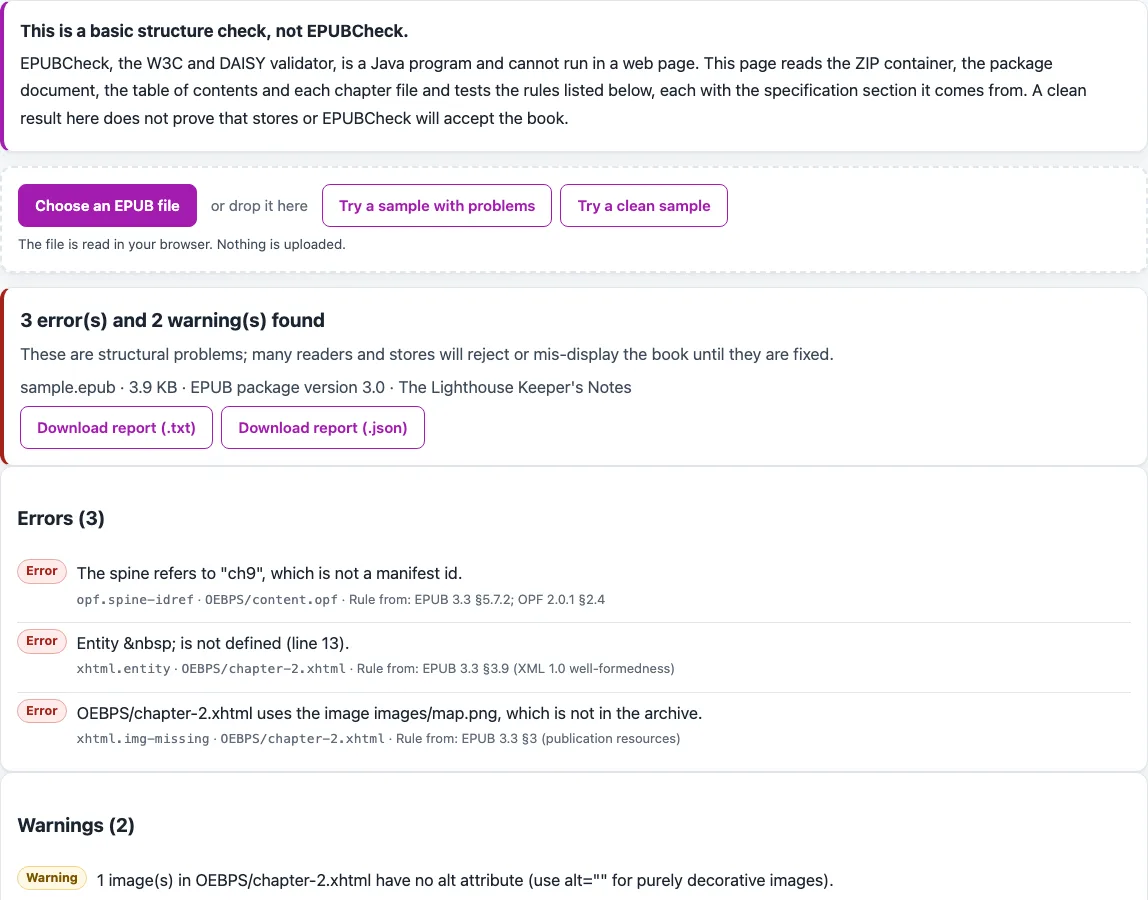
How to use the EPUB validator
- Read the notice above the file chooser. It says this is a basic structure check, not EPUBCheck.
- Select your .epub file with the file chooser, or drag it onto the page.
- Wait for the check to finish. It runs in your browser as soon as the file is chosen.
- Read the verdict line. It says ‘N error(s) and M warning(s) found’, ‘No errors found, M warning(s)’, or ‘No errors or warnings found by this basic check’.
- Go through each finding. Note its id (for example xhtml.img-missing), its severity (error, warning or note), its message, its file path and its specification section.
- Fix the files inside the book, then run the check again with the fixed file.
- If your file is over 100 MB, the tool shows a memory warning. Expect the check to take longer or to fail on a weak device.
To see how results look before you test your own book, use “Try a sample with problems”, which opens by default and shows 3 errors and 2 warnings. Use “Try a clean sample” to see a book with no errors or warnings. You can download the result as a plain-text report (.txt) or a JSON report (.json). Both include the verdict, every finding, and the statement that this is not EPUBCheck.
What does an EPUB validator check in an .epub file?
An .epub file is a ZIP archive with a set of required parts. This tool opens the archive and checks those parts against the rules in EPUB 3.3 and OPF 2.0.1. It does not judge your writing or design.
Why does the mimetype file have to come first?
EPUB 3.3 §4.3 requires a file named mimetype to be the first entry in the archive, stored without compression, with no ZIP extra field. It must contain exactly application/epub+zip, with no newline and no byte order mark. The tool also checks META-INF/container.xml, which must be well-formed, have version 1.0, and contain a rootfile with the media type application/oebps-package+xml that points to a file in the archive.
How are the package document and manifest checked?
The package document (the OPF file) must be well-formed XML and declare version 3.0 or 2.0. The tool checks that unique-identifier points to a dc:identifier, and that at least one dc:title, dc:identifier and dc:language exists. For EPUB 3, it checks for exactly one dcterms:modified in the form CCYY-MM-DDThh:mm:ssZ.
Each manifest item needs an id, an href and a media-type. Ids and hrefs must be unique, every listed file must exist, and XHTML must be typed application/xhtml+xml. Spine entries must point to manifest items, and the spine must contain at least one linear item.
Why do navigation and the table of contents matter?
An EPUB 3 book needs exactly one manifest item with the nav property. That file must be XHTML and contain one nav with epub:type toc that lists entries, and its links must point to files inside the book. An EPUB 2 book needs a spine toc attribute that points to an NCX file with a navMap.
Some checks are widely used conventions that the OPF 2.0.1 text the tool read does not define, such as the NCX dtb:uid comparison and the legacy cover meta element. The tool reports them, and files missing from the manifest, as warnings.
What do the chapter-file checks look for?
Each XHTML file must be well-formed XML and use the XHTML namespace. It must have a title, and every image, style sheet and linked file it references must exist. In EPUB 3, undefined entities such as are errors.Images without an alt attribute are reported, as are scripts or remote resources not declared in the manifest properties.
Why does a clean result not mean the book is approved?
A clean result means only that the checked rules passed. The tool does not check the grammar of XHTML, SVG or CSS, accessibility metadata, fixed layout, media overlays, MathML, fonts, audio or video, or link targets inside files (#anchors). It also does not apply the rules of any store.
Frequently asked questions
Is this EPUB validator the same as EPUBCheck?
No. EPUBCheck, the W3C and DAISY validator, is a Java program and cannot run in a web page. This tool runs a basic structure check, and the page and the downloaded report say so.
Is my book uploaded when I check it?
No. The file is read with the browser’s file API, and nothing is uploaded. The check runs in your browser.
What does ‘No errors or warnings found by this basic check’ mean?
It means the rules this tool runs found no problems. It is not a statement that the book is valid, and it is not an approval by a store or by EPUBCheck.
What happens if I choose a file that is not an EPUB?
The tool does not crash. For a file that is not a ZIP, is too small, or has no META-INF/container.xml, it returns a single error that explains what is missing.
What does the DRM message mean?
If META-INF/encryption.xml lists an algorithm other than font obfuscation (http://www.idpf.org/2008/embedding), the tool reports it as DRM. Those files are skipped, so they are not reported as broken XML.
Does the tool check every file in the archive?
It warns about files in the archive that are not listed in the manifest. The first 50 are listed in the report.
Related tools
- EPUB Metadata Editor: use it to change the title, author or other details in an EPUB.
- EPUB reader online: use it to open an EPUB in your browser.
- EPUB to Kindle: use it to check an EPUB against Amazon’s Kindle rules.
- EPUB to text: use it to get the plain text of an EPUB.
- HTML to EPUB: use it when your book starts as HTML.
- PNG to EPUB Converter: use it when your pages start as PNG images.
- TXT to EPUB: use it when your book starts as plain text.
- Word to EPUB: use it when your book starts as a Word file.