Gumroad Fees Calculator
Enter a sale price and choose a direct or Discover sale to see Gumroad's fee, card processing and what you keep per sale and per month.
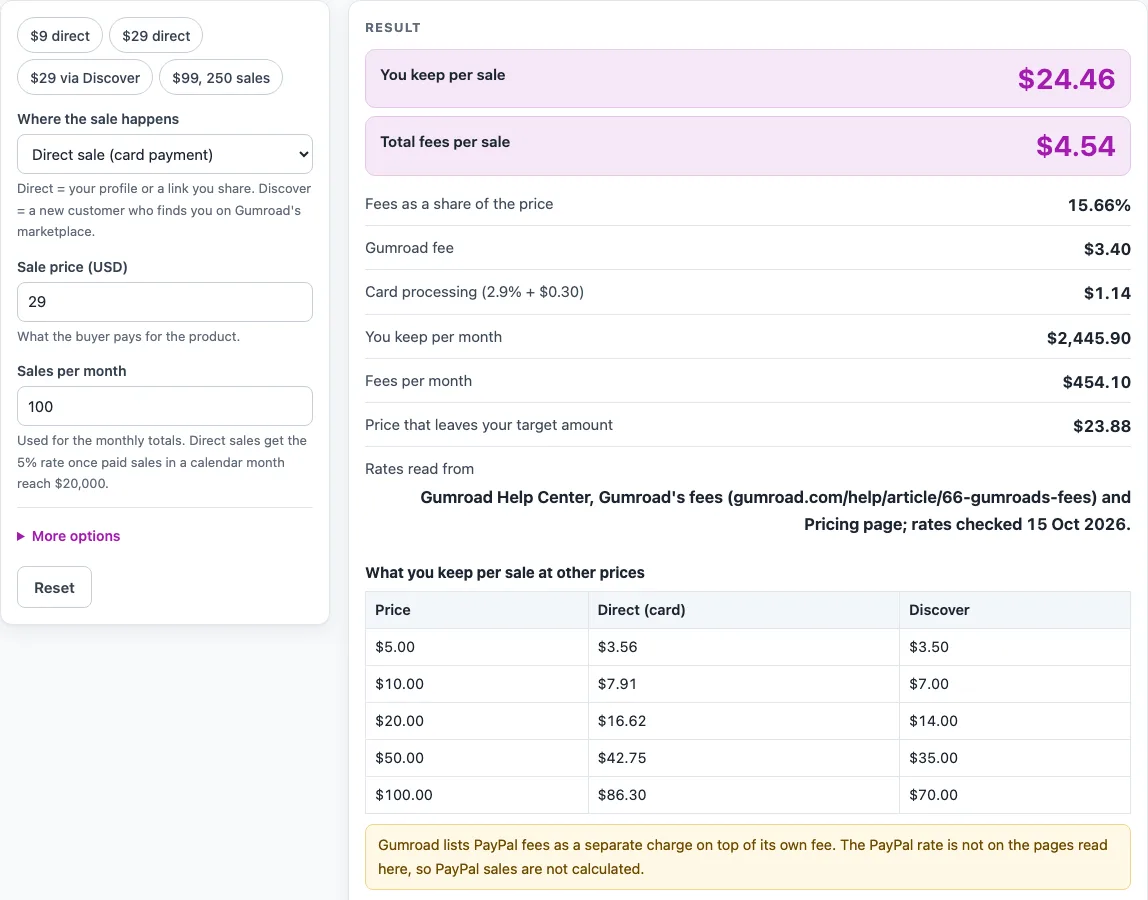
How to use the Gumroad Fee Calculator
- Under “Where the sale happens”, choose “Direct sale (card payment)” or “Gumroad Discover sale”.
- Enter the “Sale price (USD)”.
- Enter “Sales per month”. It drives the monthly outputs and is rounded down to a whole number.
- Open “More options” and enter “Amount you want to keep per sale (USD)” to get a target price. Leave it empty to skip.
- Read “You keep per sale” and “Total fees per sale”.
- Check “Fees as a share of the price” to see what share of each sale goes to fees.
- For a direct sale, “Gumroad fee” and “Card processing (2.9% + $0.30)” show the two separate parts. A Discover sale has no processing line.
- Check “Fees per month” and “You keep per month” for the monthly totals.
- If you entered a target, read “Price that leaves your target amount”.
- Read the “Rates read from” line for the sources and the date.
The tool opens with a direct sale at $29.00, 100 sales a month and a target of $20.00, so you see a full set of results straight away. The presets are “$9 direct”, “$29 direct”, “$29 via Discover” and “$99, 250 sales”. On a direct sale a warning explains that PayPal sales are not calculated. The table shows what you keep at $5, $10, $20, $50 and $100.
How much does Gumroad take from a direct sale?
Gumroad’s fee on a direct sale is 10% of the price plus $0.50 per transaction, according to its fees help page and pricing page (read 15 Oct 2026). Gumroad lists card processing of 2.9% plus $0.30 as separate from that fee, so the calculator adds it as a second charge.
For a $50.00 direct sale, the Gumroad fee is 10% × $50.00 + $0.50 = $5.50. Card processing is 2.9% × $50.00 + $0.30 = $1.75. Total fees are $7.25, so you keep $42.75, which is 14.5% of the price.
What does a Gumroad Discover sale cost?
A Gumroad Discover sale carries a flat 30% fee, which Gumroad says includes all processing fees. The calculator shows no separate processing line for Discover.
For a $50.00 Discover sale, 30% × $50.00 = $15.00, so you keep $35.00.
When does the high-volume rate apply?
Once paid sales in a calendar month reach $20,000, new direct sales that month are charged 5% + $0.50 instead of 10% + $0.50, according to Gumroad’s fees help page (read 15 Oct 2026). Discover stays at 30%. The sale that reaches the threshold is counted at the standard rate. The monthly totals in the calculator apply this rule.
How does the calculator find the price for a target amount?
The calculator works backwards from the amount you want to keep. For a direct sale, the price is (target + $0.50 + $0.30) ÷ (1 − 0.10 − 0.029). For a Discover sale, the price is target ÷ 0.70.
In the default setup, a price of $23.88 leaves $20.00 at the standard rates. This figure does not take the high-volume rate into account.
Why is card processing treated as a deduction?
Gumroad’s help page lists processing as a separate charge, but it does not say in so many words who bears it. The calculator therefore treats card processing as a deduction from what you keep.
What is left out of the calculation?
PayPal fees are not calculated. Third-party blog posts quote a PayPal rate, but Gumroad’s own page only says PayPal fees are separate and links to PayPal’s merchant-fee page, so no PayPal rate is used.
Sales tax is not modelled either. Gumroad’s fee article mentions a “10% + $0.50 fee + sales tax per transaction”, but how sales tax appears on a payout is not stated in a way that can be calculated. Other taxes, refunds, affiliate splits and currencies other than USD are also left out.
Sources (checked 15 October 2026): gumroad.com · gumroad.com
Worked examples
| Input | Result |
|---|---|
| Direct sale (card payment), price $29 | fees $4.54, you keep $24.46 |
| Gumroad Discover sale, price $29 | fees $8.70, you keep $20.30 |
| Direct sale (card payment), price $9 | fees $1.96, you keep $7.04 |
| Direct sale (card payment), price $99 | fees $13.57, you keep $85.43 |
Calculated by the tool above; open it with the same values to see each step.
Frequently asked questions
Are gumroad fees the same for every sale?
No. A direct sale is charged 10% + $0.50, a Gumroad Discover sale is charged a flat 30%, and once paid sales in a calendar month reach $20,000, new direct sales that month are charged 5% + $0.50.
Does the calculator include PayPal fees?
No. Gumroad’s own page does not give a PayPal rate, so the calculator does not use one.
Does the calculator include sales tax?
No. How sales tax appears on a payout is not stated in a way that can be calculated, so it is not modelled. The calculator does not give tax advice.
Is my data uploaded anywhere?
No. The calculator runs in your browser. You do not need to sign up, and the tool is free.
Why does the example show $23.88?
In the default setup, $23.88 is the sale price that leaves $20.00 kept at the standard rates. It is a calculation result, not a suggested price.
Does the calculator tell me what price to charge?
No. Results are calculated from the numbers you enter and the rates named on the page. The page gives no pricing advice.
When were the rates checked?
The rates were checked on 15 Oct 2026, from Gumroad’s fees help page and pricing page.
Related tools
Etsy Fee Calculator: Use it when you want to check Etsy fees instead of Gumroad fees.
Etsy Profit Calculator: Use it when you want to see what you keep from Etsy sales.
KDP Royalty Calculator: Use it when you want to estimate royalties for a book sold through KDP.
Royalties and Selling Fees: All the fee and royalty calculators on this site in one place.