HTML to EPUB
Paste HTML or choose one or more .html files. The tool removes scripts, styles and other unsafe parts, splits chapters at your headings and lists what it removed.
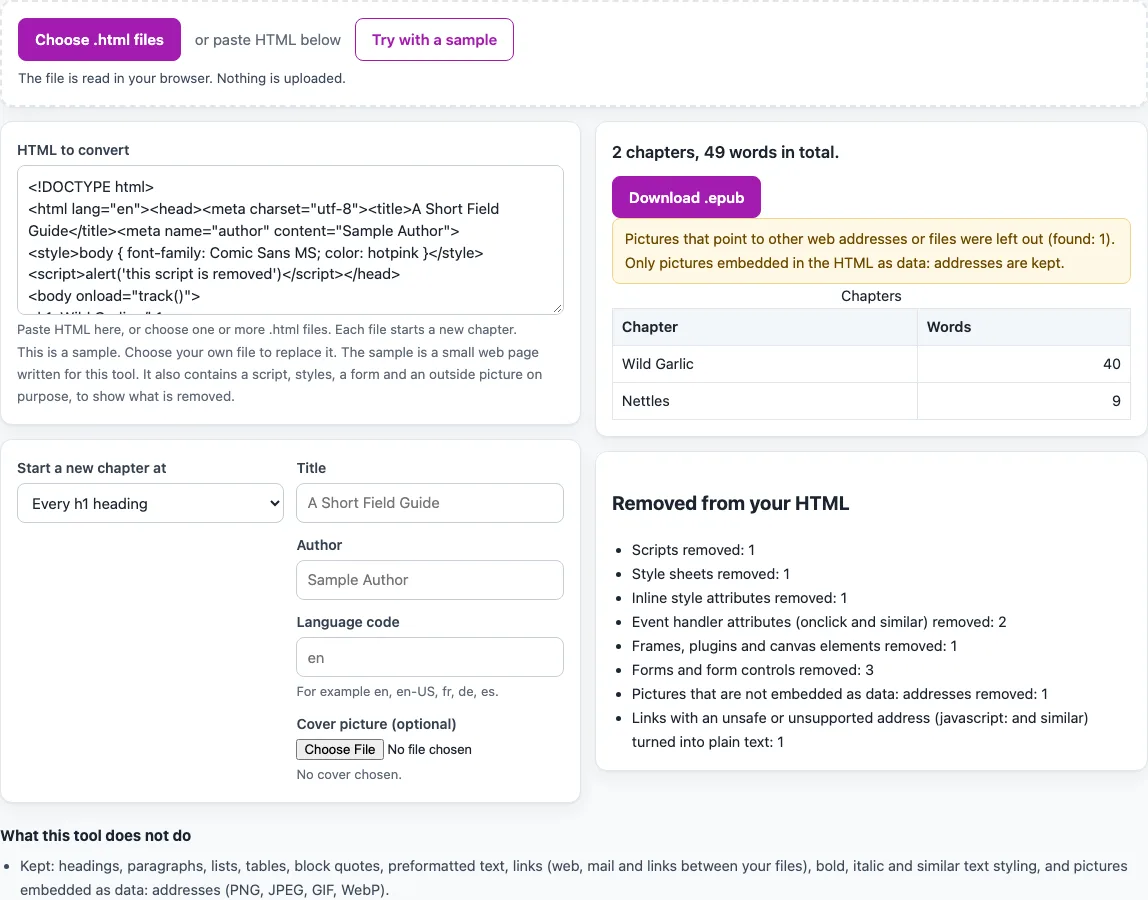
How to use the HTML to EPUB tool
- Paste your HTML into “HTML to convert”, or press “Choose .html files” and pick one or more .html, .htm or .xhtml files. The page starts with a small sample page, and “Try with a sample” brings it back.
- A chosen file is read as UTF-8, UTF-16 with a byte-order mark, or the charset named in its meta charset tag. If it is not valid UTF-8, windows-1252 is used when no charset is named, and a note under the drop zone says so.
- Under “Start a new chapter at”, choose “Every h1 heading”, “Every h1 and h2 heading” or “Nowhere (one chapter per file)”. With several files, each file starts a chapter.
- Look at the “Title”, “Author” and “Language code” fields. Their grey hints come from the page title, the meta author tag and the lang attribute of the html element. Type your own values if the hints are wrong.
- Add a picture under “Cover picture (optional)” if you want a cover.
- The result updates as you type or change a setting. Read the chapter table and its word counts.
- Read the “Notes” for anything the tool could not handle fully.
- Open “Removed from your HTML” to see how many scripts, style sheets, form controls and other items were taken out.
- Press “Download .epub” to save the file.
Nothing is uploaded at any step. Once the page has loaded, the conversion runs on your own device.
How does the converter read the encoding of my HTML?
For files you choose, the tool tries UTF-8 first, or UTF-16 when the file starts with a byte-order mark. If that fails, it uses the charset named in the page’s meta charset tag, or windows-1252 when none is named, and shows a note so you know the text may need a check. Pasted text needs no decoding.
How are chapters created from headings?
A new chapter starts at each h1 heading. You can instead start a chapter at each h1 and h2 heading, or treat each file as one chapter. Any text that comes before the first heading becomes a first chapter, named after the page title. When you use several files, each file starts a chapter, and its title comes from the page title or the file name. Links between the files and to ids inside them are rewritten so they point to the right chapter file. A link that cannot be matched to a target becomes plain text.
Which parts of a page are kept, and which are removed?
The tool keeps the structure that carries meaning: headings from h1 to h6, paragraphs, ordered and unordered lists, definition lists, tables with colspan and rowspan, block quotes, preformatted text, line breaks, horizontal rules, links, and inline styling such as bold, italics, code and subscript. Wrapper elements such as div, section and nav are unwrapped, and their text is kept as paragraphs.
Scripts, style elements, inline style attributes, event-handler attributes, iframes, objects, embeds, canvas, forms, audio, video, SVG, MathML and comments are removed, and class names and most other attributes are dropped. Each kind of removal is counted. Links that use an address other than http, https, mailto, tel, a page anchor or a relative file name are turned into plain text.
What happens to pictures and links?
Only pictures embedded as data addresses in PNG, JPEG, GIF or WebP format are kept. Each is stored as a file in the EPUB, once even if used twice. Pictures that point to a web address or a file name, SVG pictures and pictures that cannot be read are removed and counted. Linked pictures are not downloaded.
Why can the EPUB look different from the browser view?
The tool uses a small, tolerant tokenizer written for this purpose, not a full HTML parser. It handles upper-case tags, unquoted attributes and missing end tags for p, li, dt, dd, tr, td and th, but it does not perform every repair a browser performs, so badly nested pages can be arranged differently. The output is well-formed XHTML; for very broken pages, compare the chapter list and removal list with what you expected.
Sources (checked 15 October 2026): w3.org · html.spec.whatwg.org
Frequently asked questions
Is my HTML uploaded anywhere?
No. Everything runs in your browser. Your pasted text and files are not uploaded, and nothing is fetched from the web.
Which file encodings can I use?
UTF-8 and UTF-16 with a byte-order mark are read directly. If a file is not valid UTF-8, the tool uses the charset named in the page’s meta charset tag, or windows-1252 when none is named, and shows a note.
Why were some of my pictures removed?
Pictures that link to a web address or a file name, SVG pictures and pictures that cannot be read are removed. Only embedded PNG, JPEG, GIF and WebP pictures are kept. Each removal is counted in the “Removed from your HTML” list.
Will my CSS layout appear in the EPUB?
No. Page layout, including columns, colours, fonts and floats, is not kept, and class names are dropped. The EPUB keeps your text, headings, lists, tables and basic inline styling.
Why does a link show as plain text?
Links are kept only when they point to http, https, mailto, tel, a page anchor or a relative file name. Links to other addresses, such as javascript: links, become plain text. A link to a file or id that cannot be found is also turned into plain text.
Is the EPUB checked for errors?
The output is well-formed XHTML. It is a basic EPUB 3 file and is not checked with EPUBCheck here. If you need a formal check, use the EPUB Validator.
Does the tool need a sign-up?
No. It is free and needs no sign-up.
Related tools
- EPUB Metadata Editor: use it to review or change the book’s details after conversion.
- EPUB reader online: use it to open your finished EPUB and check how the chapters read.
- EPUB to Kindle: use it when you want to convert an EPUB for Kindle reading.
- EPUB Validator: use it for a separate structural check of an EPUB file.
- TXT to EPUB: use it when your source is a plain text file.
- Word to EPUB: use it when your source is a Word document.