ISBN Converter
Type an ISBN-10 or ISBN-13, or paste a list, to get both forms with the check digit verified and a plain reason if the number is wrong.
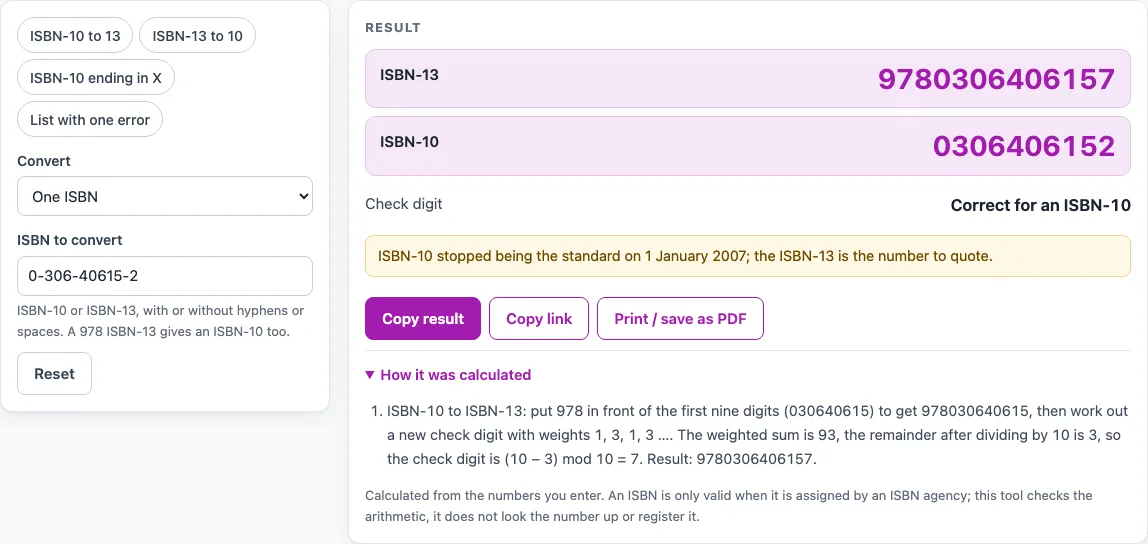
How to use the ISBN Converter
- Under “Convert”, keep “One ISBN” for a single number. To start with an example, press the preset “ISBN-10 to 13” or “ISBN-13 to 10”.
- Type the number into “ISBN to convert”, with or without hyphens or spaces. A leading label such as “ISBN”, “ISBN-10:” or “ISBN-13:” is ignored.
- Read the results. A valid number shows “ISBN-13”, “ISBN-10” and “Check digit” as “Correct for an ISBN-10” (or ISBN-13). The output is plain digits.
- If the check digit is wrong, the page says what the last digit should be. Instead of a converted number it shows “ISBN-13 if the other digits are right” and “ISBN-10 if the other digits are right”. Use them only if the other digits are correct, because they change only the last digit.
- If the number starts with 979, ISBN-10 shows “none (979)”, because those numbers have no ISBN-10.
- For several numbers, choose “A list of ISBNs” under “Convert” and put one ISBN on each line. You can enter up to 5,000 lines, and blank lines are skipped.
- Read the “Converted list” table: “#”, “You entered”, “Valid?” (Yes or No), “ISBN-10”, “ISBN-13” and “Note”. The “List result” line counts valid and invalid lines.
The preset “ISBN-10 ending in X” shows how a check digit of 10 is written as X. The preset “List with one error” loads five lines with one wrong check digit. List text is also written into the page address, so do not share a link made from a list you want to keep private.
How does an ISBN-10 become an ISBN-13?
To convert an ISBN-10 to an ISBN-13, the tool puts 978 in front of the first nine digits and works out a new check digit. The old ISBN-10 check digit is dropped, because the new number has its own check digit.
The new check digit uses weights of 1, 3, 1, 3 and so on across the first twelve digits. Each digit is multiplied by its weight, the results are added, and the total is divided by 10. The check digit is the number needed to bring the remainder up to the next multiple of 10. For 0-306-40615-2, the digits 978030640615 give a weighted sum of 93. The remainder is 3, so the check digit is 7, giving 978-0-306-40615-7.
How is the ISBN-10 check digit worked out?
An ISBN-10 check digit uses weights of 10 down to 2 on the first nine digits, and the total is divided by 11. The ISBN Users’ Manual leaves this method to the agency’s website, so this page follows Wikipedia’s ISBN article (read 15 Oct 2026). The check digit is 11 minus the remainder. A result of 11 becomes 0, and a result of 10 is written as X.
The ISBN-13 978-92-95055-12-4 is the example in the ISBN Users’ Manual, 7th edition (read 15 Oct 2026). Removing 978 and the last digit leaves 929505512. The weighted sum is 267, the remainder after dividing by 11 is 3, and the check digit is 8. The ISBN-10 is 9295055128.
How does an ISBN-13 become an ISBN-10?
Only numbers starting with 978 can become an ISBN-10. The tool drops the 978 and the old check digit, then works out a new check digit with weights of 10 down to 2 and modulus 11. For example, 978-0-8044-2957-3 becomes 0-8044-2957-X. The digits 080442957 give a weighted sum of 199, which leaves a remainder of 1, so the check digit is 10, written as X.
Why do some ISBN-13 numbers have no ISBN-10?
Numbers starting with 979 have no ISBN-10, because the conversion rule works only for numbers starting with 978. The tool states this in the result, the steps, a warning and the list table, where it shows “none (979)”.
Why does the tool not add hyphens?
The tool outputs plain digits. Where hyphens go depends on the agency’s range table for the registration group and publisher. The page does not use those tables, so it does not place hyphens.
Sources (checked 15 October 2026): isbn-international.org · en.wikipedia.org · isbn-international.org
Worked examples
| Input | Result |
|---|---|
| ISBN 0-306-40615-2 | ISBN-13 9780306406157, ISBN-10 0306406152 |
| ISBN 978-0-306-40615-7 | ISBN-13 9780306406157, ISBN-10 0306406152 |
| ISBN 0-9752298-0-X | ISBN-13 9780975229804, ISBN-10 097522980X |
| ISBN 978-92-95055-12-4 | ISBN-13 9789295055124, ISBN-10 9295055128 |
| A list of 3 ISBNs | 3 lines: 2 valid, 1 not valid |
Calculated by the tool above; open it with the same values to see each step.
Frequently asked questions
Does a valid check digit mean the book exists?
No. The tool checks the arithmetic of the check digit only and does not look the number up. A number that passes may still not have been assigned to any book.
What do I do if the check digit is wrong?
The page says what the last digit should be and shows no converted number as if it were valid. If the other digits are right, you can use “ISBN-13 if the other digits are right” or “ISBN-10 if the other digits are right”, which only repair the last digit. In a list, a wrong line is marked No and is not converted.
Can I convert a number starting with 979 to an ISBN-10?
No. ISBN-13 numbers starting with 979 have no ISBN-10, and the tool says so in the result.
Why are my hyphens missing from the output?
The tool does not put hyphens back in, because correct placement depends on the agency’s range table, which the page does not use. The output is plain digits.
Is my list kept private?
Nothing is uploaded, because everything runs in your browser. List text is also written into the page address, so avoid sharing a link made from a list you want to keep private.
Related tools
ISBN-13 Check Digit Calculator: use it when you want to check or work out the last digit of an ISBN-13 by itself.
ISBN Cost Calculator: use it when you want to work out the cost side of buying or using ISBNs for your books.
KDP Print Cost Calculator: use it when you are estimating the printing cost of a print book.
KDP Cover Calculator: use it when you need the size of a cover for a print book.
Self-Publishing Cost Calculator: use it when you want an overview of the costs of publishing a book yourself.
Book Costs, KDP Covers and ISBNs: The other cost and ISBN pages on this site.