KDP Cover Calculator
Enter the trim size, page count and paper to get the spine width and the full cover size with bleed, plus the pixel size, barcode area and spine-text rule.
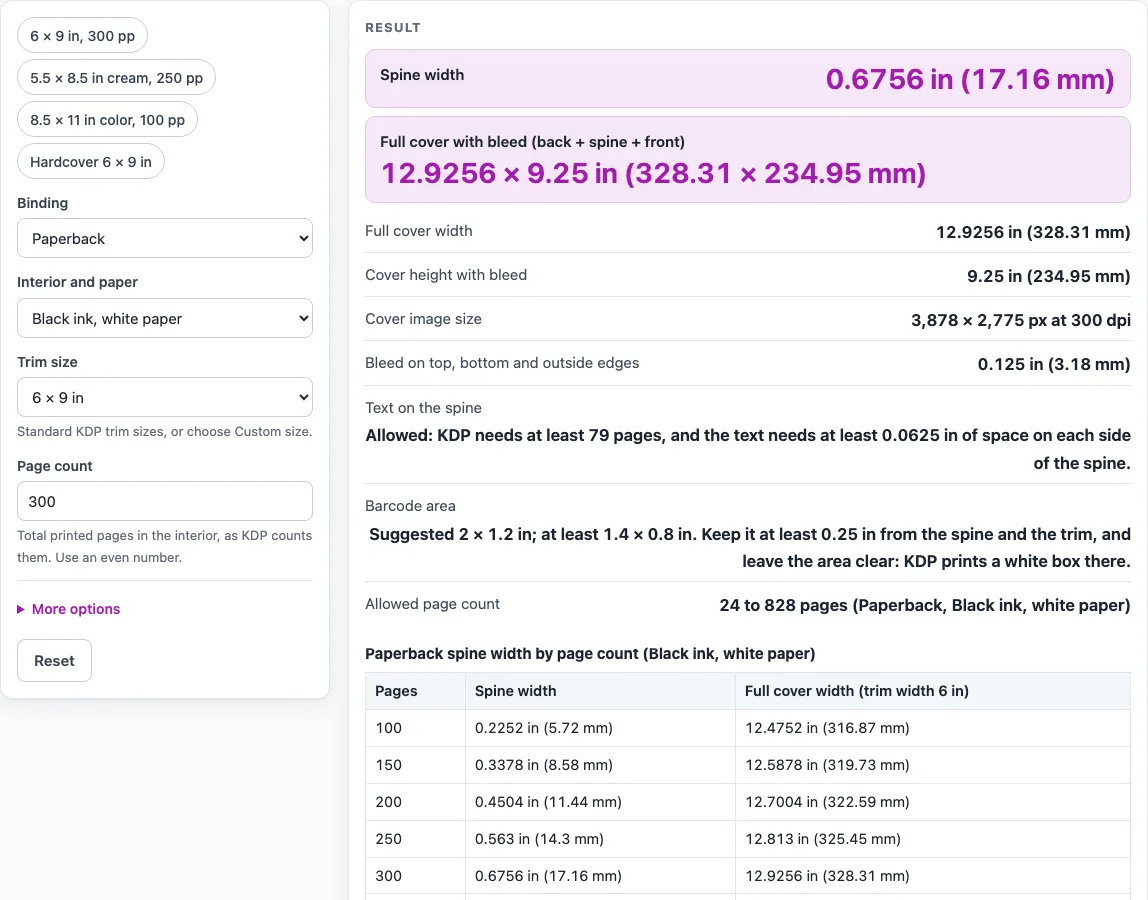
How to use the KDP Cover Calculator
- Under “Binding”, choose “Paperback” or “Hardcover (case laminate)”. You can also start from a preset such as “6 × 9 in, 300 pp”.
- Under “Interior and paper”, choose “Black ink, white paper”, “Black ink, cream paper”, “Standard color, white paper” or “Premium color, white paper”. Standard color is not offered for hardcover, and choosing it gives an error that explains why.
- Under “Trim size”, choose a KDP size from the list, or choose “Custom size” and enter “Trim width” and “Trim height” in inches or millimeters. Custom sizes outside width 4 to 8.5 in or height 6 to 11.69 in give a warning.
- Enter the “Page count”.
- Read the “Spine width”, the full cover width and height, and the “Cover image size” in pixels.
- Check the “Barcode area”, suggested at 2 × 1.2 in with a minimum of 1.4 × 0.8 in.
- Under “Show lengths first in”, choose “Inches” or “Millimeters”.
For a hardcover, the spine width and full cover size are not calculated, so use KDP’s own cover calculator for those two numbers. Two tables on the page show spine widths and full cover widths from 100 to 600 pages on your chosen paper, and the spine width of your page count on each of the four papers.
How is the spine width of a KDP paperback calculated?
The spine width is the page count multiplied by a paper factor in inches per page. The factor is 0.002252 for black ink on white paper, 0.0025 for black ink on cream paper, 0.002252 for standard color, and 0.002347 for premium color, as KDP publishes them. For example, a 300-page book on white paper has a spine of 300 × 0.002252 = 0.6756 in (17.16 mm).
Cream paper is thicker per page, so the same page count gives a wider spine. That is why the paper choice changes the result even when the trim size and page count stay the same.
What size does a KDP paperback cover need to be?
The full cover width is the bleed, back cover, spine, front cover and bleed added together. The bleed is 0.125 in (3.2 mm) on each outer edge. The height is the bleed, trim height and bleed added together.
Take a 6 × 9 in paperback of 300 pages on white paper. The spine is 0.6756 in, so the cover is 0.125 + 6 + 0.6756 + 6 + 0.125 = 12.9256 in wide and 0.125 + 9 + 0.125 = 9.25 in high.
The cover image size in pixels is the cover size in inches multiplied by 300 dpi, rounded to a whole pixel. The cover above becomes about 3,878 × 2,775 px. A second case, 5.5 × 8.5 in on cream paper with 200 pages, has a spine of 0.5 in and a cover of 11.75 × 8.75 in, which is 3,525 × 2,625 px.
Spine text is allowed from 79 pages. KDP’s paperback cover page says 79, while the Cover Creator page says 80, and this tool uses 79 and states the difference. Spine text needs at least 0.0625 in of space around it.
Sources (checked 15 October 2026): kdp.amazon.com · kdp.amazon.com · kdp.amazon.com · kdp.amazon.com
Worked examples
| Input | Result |
|---|---|
| 6 × 9 in, 300 pages, Black ink, white paper, Paperback | spine 0.6756 in, cover 12.9256 × 9.25 in |
| 5.5 × 8.5 in, 200 pages, Black ink, cream paper, Paperback | spine 0.5 in, cover 11.75 × 8.75 in |
| 8.5 × 11 in, 120 pages, Premium color, white paper, Paperback | spine 0.2816 in, cover 17.5316 × 11.25 in |
| 6 × 9 in, 250 pages, Black ink, white paper, Paperback | spine 0.563 in, cover 12.813 × 9.25 in |
| 6 × 9 in, 300 pages, Black ink, white paper, Hardcover (case laminate) | wrap 0.51 in, hinge 0.4 in; spine not published |
Calculated by the tool above; open it with the same values to see each step.
Frequently asked questions
Why does the tool use 79 pages for spine text when Cover Creator says 80?
KDP’s paperback cover page says 79, and the Cover Creator page says 80. The tool follows the paperback cover page and states the difference on the page, so check the figure you are working from.
What happens if my page count is outside the allowed range?
A warning appears, but the numbers still follow the formula. Allowed counts are 24 to 828 for black ink on white, 24 to 776 for cream, 72 to 600 for standard color, and 24 to 828 for premium color.
Can this tool calculate a hardcover spine?
No. KDP’s help pages do not publish a hardcover spine formula, so the tool shows the published hardcover values instead: a 0.51 in (12.95 mm) wrap, a 0.4 in (10.16 mm) hinge space, text and images 0.635 in (16.13 mm) from the edge, and 75 to 550 pages.
Why can’t I choose standard color for a hardcover?
KDP does not offer standard color for hardcover, so the tool gives an error that explains this. Choose another paper option for a hardcover.
Do I need to leave space for a barcode?
Yes, if you do not supply a barcode. The barcode area is kept at least 0.25 in from the spine and the trim, and KDP prints a white box there if you leave it empty. The tool does not compute a corner for the barcode.
Which page count limits does the tool use?
The tool uses the limits on KDP’s help pages, 24 to 828 pages and 75 to 550 pages for hardcover. KDP’s online cover calculator page showed other values in a fragment that could not be read in full, so the help page values are used.
Related tools
- ISBN-13 Check Digit Calculator: use it to find the check digit for a 12-digit ISBN-13 before you add it to your cover.
- ISBN Converter: use it when you need to convert an ISBN between formats.
- ISBN Cost Calculator: use it to work out the cost of buying ISBNs for your titles.
- KDP Print Cost Calculator: use it to estimate printing costs for a paperback or hardcover you plan to publish through KDP.
- Self-Publishing Cost Calculator: use it to add up the expenses of publishing a book yourself, from start to finish.