KDP Royalty Calculator
Choose the format, enter the list price and the file size or page count to see the royalty per copy and per month, and which KDP rule applied.
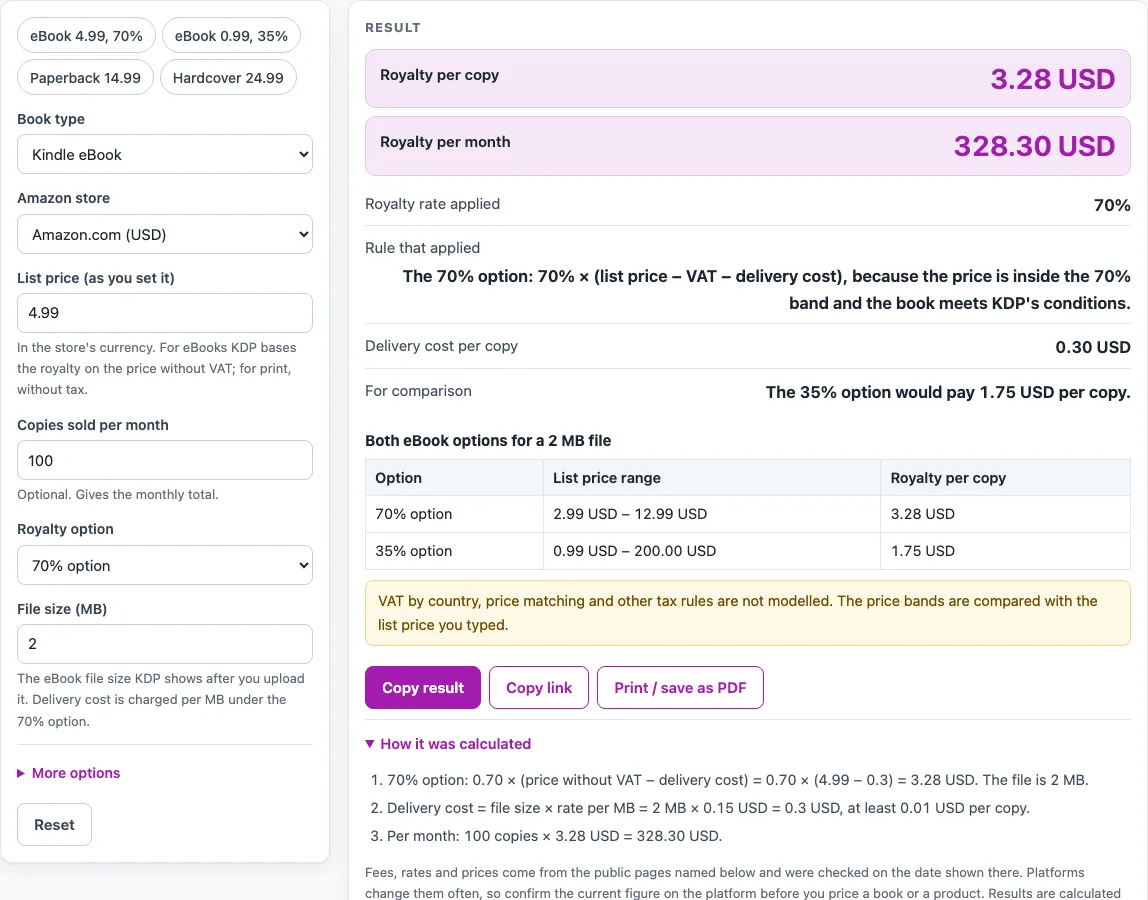
How to use the KDP Royalty Calculator
- Under “Book type”, choose “Kindle eBook”, “Paperback” or “Hardcover”. The form only shows the fields for the type you pick.
- For an eBook, choose the “Amazon store” you sell in, such as Amazon.com, Amazon.co.uk or Amazon.co.jp.
- Enter the “List price (as you set it)” in the currency of that store.
- Enter the “File size (MB)”. The tool rounds up to the next kilobyte and treats 1 MB as 1,024 KB.
- Under “Royalty option”, choose the “70% option” or the “35% option”, and enter “Copies sold per month”.
- Open the advanced options only if they apply: “Book is enrolled in KDP Select”, “Mostly public-domain content”, “VAT rate in the customer’s country (%)” and “Lowest list price of the print edition”.
- Read “Royalty per copy” and “Royalty per month”, then check “Royalty rate applied” and “Rule that applied”.
- Check “Delivery cost per copy” and the “For comparison” line, which shows what the other option would pay.
- For a paperback or hardcover, choose the “Amazon store”, “Interior and paper”, “Trim size”, “Page count”, list price and copies per month. For a paperback, tick “Sold through Expanded Distribution (40%)” to use the 40% rate.
- Read “Printing cost per copy” and “Minimum list price”. If a warning appears, change the price or option and the results update.
Nothing you type is uploaded, and no sign-up is needed.
How does the KDP eBook royalty formula work?
The 70% option pays 0.70 × (list price − VAT − delivery cost). The 35% option pays 0.35 × (list price − VAT), with no delivery cost. Delivery cost is the file size in MB multiplied by a per-MB rate for the store, with a minimum per copy of 0.01 for most stores and 1 for JPY, MXN and INR.
Take a 2 MB eBook priced at 4.99 USD on Amazon.com under the 70% option. The delivery cost is 0.30 USD, so the royalty is 0.7 × (4.99 − 0.30) = 3.283, shown as 3.28 USD. At 100 copies a month, that is 328.30 USD.
The 70% option applies only when every condition is met. The list price must sit inside the store’s 70% band, which for Amazon.com is 2.99 to 12.99 USD since 7 July 2026 (it was 9.99 before that date). The book must not be mainly public-domain content. If a print list price is entered, the eBook price must be at least 20% below the lowest print list price. In Brazil, Japan, Mexico and India, the book must also be in KDP Select. When a condition fails, the tool uses the 35% rate and says why.
Take the same 2 MB book at 13.99 USD. That is above 12.99, so the 70% option does not apply. The 35% rate gives 0.35 × 13.99 = 4.8965, shown as 4.90 USD, and the tool shows a warning.
VAT is handled before the royalty is worked out. If you enter a VAT rate, the tool takes VAT as rate ÷ (1 + rate) × the VAT-inclusive price and removes it first.
How is a paperback or hardcover royalty worked out?
The print royalty is the royalty rate multiplied by the list price without tax, minus the printing cost. The printing cost uses KDP’s formula: a fixed cost plus pages × a per-page cost. The print rate is 60% from a list price of 9.99 USD (or the store’s threshold) and 50% below it. Expanded Distribution pays 40% and is not available for hardcover.
A 300-page 6 × 9 in paperback at 14.99 USD earns 0.6 × 14.99 − 4.60 = 4.394, shown as 4.39 USD. A 24.99 USD hardcover of 300 pages on Amazon.com, with a printing cost of 9.25, earns 0.6 × 24.99 − 9.25 = 5.744, shown as 5.74 USD.
Two hardcover rules differ between KDP’s pages. The US hardcover printing cost is 5.65 USD fixed on the Hardcover Printing Cost page and 5.50 USD on the Hardcover (Beta) page. The tool uses the printing cost page and shows a warning. The hardcover royalty is 50% or 60% by list price on the Hardcover Royalty page, but a fixed 60% on the Beta page. The tool uses the thresholds from the Hardcover Royalty page and shows a warning.
Sources (checked 15 October 2026): kdp.amazon.com · kdp.amazon.com · kdp.amazon.com · kdp.amazon.com · kdp.amazon.com · kdp.amazon.com · kdp.amazon.com
Worked examples
| Input | Result |
|---|---|
| eBook of 2 MB, 70% option at 4.99 USD | royalty 3.28 USD per copy |
| eBook of 1 MB, 35% option at 2.99 USD | royalty 1.05 USD per copy |
| eBook of 5 MB, 70% option at 3.99 GBP | royalty 2.44 GBP per copy |
| Paperback of 300 pages at 14.99 USD | royalty 4.39 USD per copy |
| Hardcover of 300 pages at 24.99 USD | royalty 5.74 USD per copy |
Calculated by the tool above; open it with the same values to see each step.
Frequently asked questions
Is the KDP royalty calculator free to use?
Yes. It is free and needs no sign-up. The calculation runs in your browser, and nothing you type is uploaded.
Does the kdp royalties calculator set a price for my book?
No. It calculates the royalty for the list price you enter and does not recommend a price. It also shows a minimum list price for print, so you can see the figure the print rules set.
Why does the tool show the 35% rate for my eBook?
The 70% option needs the list price inside the store’s band, the book not to be mainly public-domain content, the eBook price to be at least 20% below the lowest print list price, and, in Brazil, Japan, Mexico and India, the book to be in KDP Select. The tool says which condition failed.
Does the kdp digital royalty calculator include VAT?
Only when you enter a VAT rate. The tool removes VAT from the VAT-inclusive price before it works out the royalty. It does not look up VAT by country, so check the rate that applies to your sales.
How current are the rates?
The rates were read from KDP’s help pages on 15 Oct 2026. KDP changes its rates, so confirm the figure on KDP before you price a book.
Related tools
- Etsy Fee Calculator: use it when you sell on Etsy and want to see the fees on a listing.
- Etsy Profit Calculator: use it when you want to see what is left from an Etsy sale after your costs.
- Gumroad Fees Calculator: use it when you sell digital products on Gumroad and want to estimate the fees.
- KDP Print Cost Calculator: use it to see the printing cost and minimum list price behind the print royalty.
- KDP Cover Calculator: use it to get the spine width and full cover size for a paperback.
- Self-Publishing Cost Calculator: use it to add up what publishing a book costs before you work out your royalty.
- ISBN Cost Calculator: use it to budget for ISBNs alongside your print costs.