Reading Speed Test
Read a short public-domain passage, press Done, and see your words per minute next to the published averages, with an optional comprehension check. You can also use it as a reading speed calculator with your own text.
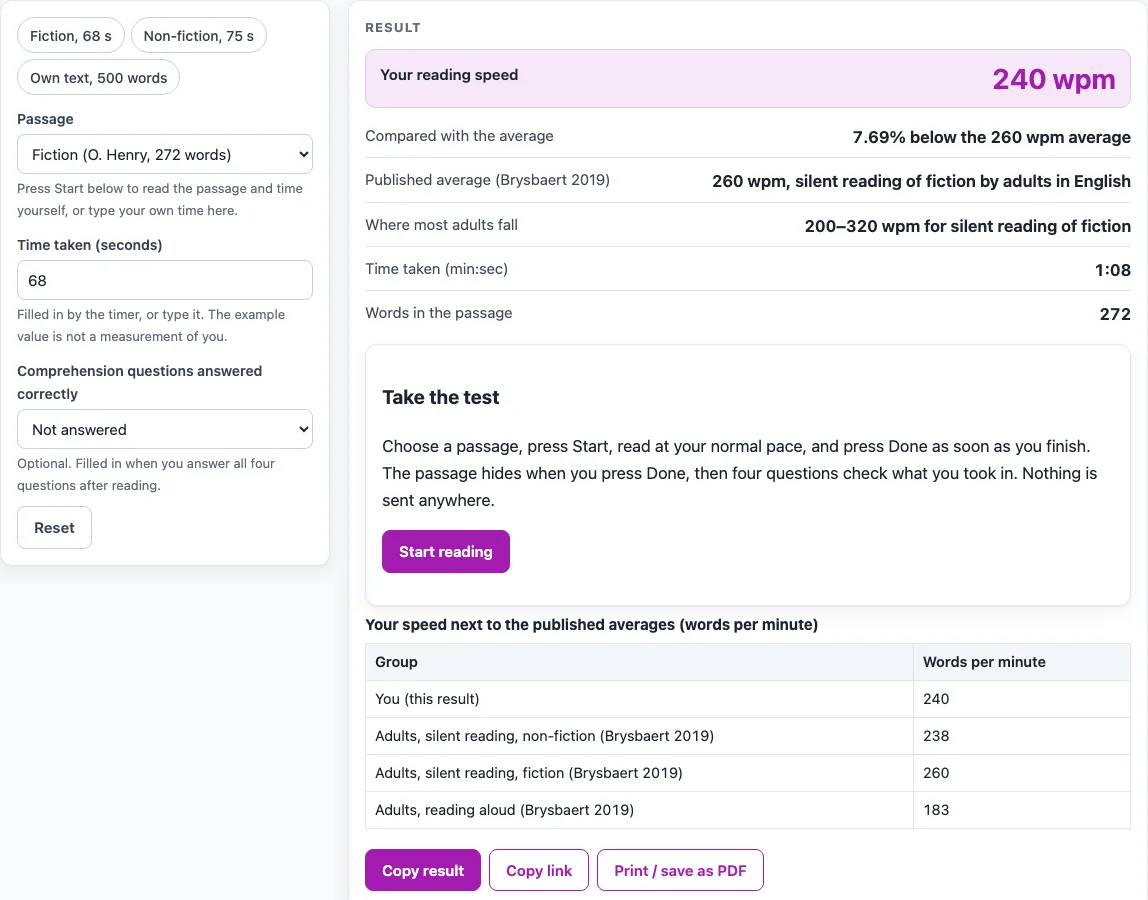
How to use the Reading Speed Test
- Under “Passage”, choose “Fiction (O. Henry, 272 words)” or “Non-fiction (B. Franklin, 300 words)”. The fiction passage is the opening of The Gift of the Magi, and the non-fiction passage is the opening of Benjamin Franklin’s Autobiography.
- Press “Start reading”. The passage appears and a clock runs.
- Read the passage at your normal pace.
- Press “Done”. The passage hides and “Time taken (seconds)” is filled in.
- Answer the four multiple-choice questions about the passage. When all four are answered, “Comprehension questions answered correctly” is filled in.
- Read “Your reading speed”, shown in wpm, and compare it with the averages in the table. Press “Try again” to read the passage once more.
For your own text, choose “My own text (type word count)”, then type “Words in your text” and “Time taken (seconds)”. You can also type the seconds yourself for a built-in passage if you timed yourself elsewhere.
Everything runs in your browser. Your seconds and answers appear in the page address, so you can copy that address to share your result. A warning appears for a result above 1,000 wpm and below 50 wpm, and a reading below 50 wpm usually means the timer was left running.
How is reading speed calculated?
Reading speed is words divided by time. The tool divides the number of words in the passage by the seconds you took, converted to minutes: words ÷ (seconds ÷ 60) = wpm. The page times you with performance.now(), so the seconds are measured by your browser clock.
Words are counted by one stated rule: whitespace-separated pieces that contain a letter or a digit. Punctuation on its own does not count as a word. This rule is applied the same way to the built-in passages and to your own text.
For example, the fiction passage read in 68 seconds gives 272 ÷ (68 ÷ 60) = 240 wpm. The 68 seconds are an example, not a measurement of any visitor. The page then compares 240 wpm with the adult average for fiction, which is 260 wpm. The comparison is wpm ÷ average − 1, shown as a percent, so 240 ÷ 260 − 1 gives −7.69%, meaning 7.69% below the average.
Comprehension matters too. After you press Done, four multiple-choice questions appear. The comprehension-adjusted speed is wpm × (correct answers ÷ 4). For example, the non-fiction passage read in 75 seconds is 300 ÷ (75 ÷ 60) = 240 wpm, and with 3 of 4 correct the adjusted speed is 240 × 3 ÷ 4 = 180 wpm. This is a simple adjustment made on this page. No published standard for it was found, so treat it as a rough guide.
What is a typical reading speed for adults?
The averages on this page come from Brysbaert (2019), which reviewed research on adult reading. The paper reports that adults average 260 wpm when silently reading fiction and 238 wpm when reading non-fiction. For reading aloud, the average is 183 wpm. The silent averages came from 190 studies with 18,573 participants, and the aloud average came from 77 studies with 5,965 participants.
The paper also gives a range where most adults fall: 175 to 300 wpm for non-fiction and 200 to 320 wpm for fiction. A result inside that range is typical, while a result outside it is not necessarily a problem. Speed depends on the text, the reader, and the purpose of reading.
Your result is shown in a table next to all three averages: non-fiction, fiction, and aloud. For your own text, the page compares your speed with both silent averages.
Sources (checked 15 October 2026): doi.org · gutenberg.org · gutenberg.org
Worked examples
| Input | Result |
|---|---|
| 272 words in 68 s | 240 wpm |
| 300 words in 75 s | 240 wpm |
| 272 words in 55 s | 296.7 wpm |
| 1200 words in 300 s | 240 wpm |
Calculated by the tool above; open it with the same values to see each step.
Frequently asked questions
Is the Reading Speed Test free and does it need an account?
Yes. The tool is free, and no sign-up is needed. Everything runs in your browser, so you can start reading the passage right away.
Are my texts uploaded or saved?
No. No. Nothing is uploaded. When you use “My own text”, you type only a word count and a time, and no text is pasted. The seconds and answers appear in the page address as the shareable result.
Why are there four questions after I finish reading?
The questions check how much of the passage you understood. When all four are answered, the number correct is filled in. The comprehension-adjusted speed uses that number to scale your wpm.
Why did I see a warning about my result?
The page warns when your speed is above 1,000 wpm, because the paper cites research showing that this is not possible without severe loss of understanding. It also warns when your speed is below 50 wpm, which usually means the timer was left running.
Which average should I compare my result with?
Compare fiction results with the 260 wpm fiction average, and non-fiction results with the 238 wpm non-fiction average. The aloud average of 183 wpm applies only to reading aloud. The table shows all three next to your speed.
Can I test a passage that is not built in?
Yes. Choose “My own text” and type the word count and the seconds you took. The result is calculated from those numbers, and the page compares it with the silent averages.
Related tools
- Words per Minute Calculator: Use it when you already know your word count and time and want the wpm figure alone.
- Reading Time Calculator: Use it to estimate how long a text will take a reader to finish.
- Audiobook Length Calculator: Use it to estimate how long a finished audiobook will run.
- Audiobook Speed Calculator: Use it to check how a narration speed changes the running time.
- Speech Time Calculator: Use it to estimate how long a spoken talk or speech will last.