Speech Time Calculator
Enter the number of words to see how long a speech takes, or enter the time to see how many words fit, at a pace with a named source.
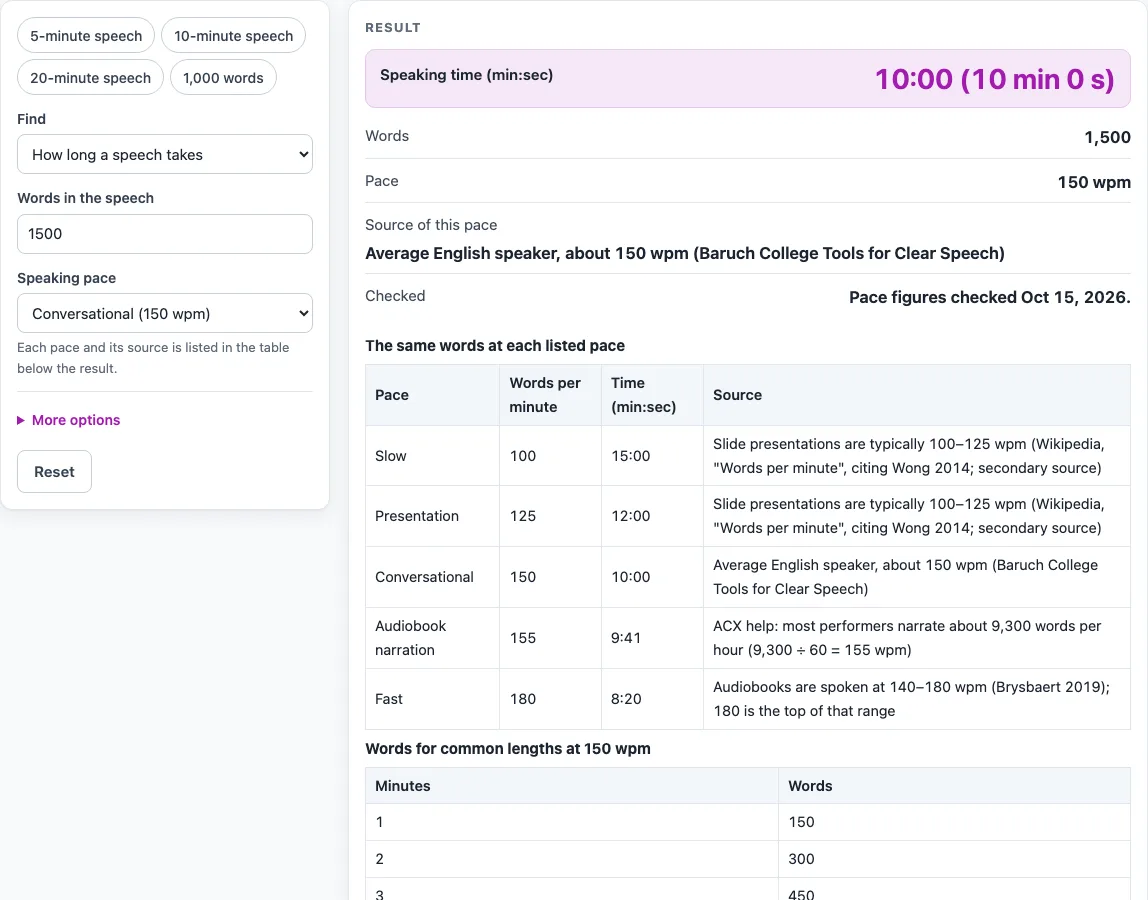
How to use the Speech Time Calculator
- In “Find”, choose “How long a speech takes” if you have a script and want its length, or “How many words fit the time” if you have a time limit and want a word target.
- Enter what you know. For time, enter the word count under “Words in the speech”. For words, enter the time as minutes and seconds; hours sit under the advanced options.
- Under “Speaking pace”, choose a listed pace: Slow (100 wpm), Presentation (125 wpm), Conversational (150 wpm), Audiobook narration (155 wpm) or Fast (180 wpm). Each one is labelled with its source.
- Or choose “My own pace” and enter any number above zero in “Your speaking pace (words per minute)”. A warning appears below 60 wpm and above 250 wpm, which is above every listed pace.
- Read the result. Time appears as min:sec, for example 10:00, with the long form in brackets. Lengths over an hour show minutes above 60, such as 60:00. Word counts are rounded to the nearest whole word.
- Compare the paces. The first table shows the same words, or the same time, at all five listed paces, with the source of each.
- Check a range of lengths. The second table gives word counts for 1, 2, 3, 5, 10, 15, 20, 30, 45 and 60 minutes at the pace you selected.
The tool starts with 1,500 words at conversational 150 wpm, which gives 10 min 0 s (10:00). To skip typing, use a preset. The 5, 10 and 20-minute speech presets find words, and the 1,000-word preset finds time.
How does a speech time calculator work?
A speech time calculator divides a word count by a speaking pace to get a time, or multiplies a pace by a time to get a word count. The two formulas are time = words ÷ wpm and words = wpm × minutes.
Words per minute is the number of words you say in one minute. If a speech has 1,500 words and you speak at 150 wpm, the time is 1,500 ÷ 150 = 10 minutes, shown as 10:00. Going the other way, 5 minutes at 150 wpm is 5 × 150 = 750 words. The same formulas work at any pace. At the presentation pace of 125 wpm, a 5-minute speech is 625 words. At audiobook narration pace of 155 wpm, a 20-minute recording is 3,100 words.
Some results are not whole numbers. A time of 10.5 minutes, for example, is 10 minutes 30 seconds. Word counts are rounded to the nearest whole word. Because the pace is an average, the result is an estimate, not a guarantee of how long you will take on the day.
Why do speaking paces differ between sources?
Speaking paces differ because each source describes a different kind of speaking. The listed paces come from the following sources:
- Slide presentations are typically 100–125 wpm, which the tool shows as slow 100 and presentation 125. This comes from Wikipedia, citing Wong 2014, a secondary source.
- Conversational 150 wpm is the average English speaker, according to Baruch College Tools for Clear Speech. That source gives about 150 wpm as the average and 140 wpm as the suggested comfortable pace.
- Audiobook narration at 155 wpm is ACX’s 9,300 words per hour divided by 60.
- Fast 180 wpm is the top of the 140–180 wpm audiobook range in Brysbaert (2019).
The tool shows these sources side by side as separate presets and does not average them. Pick the pace that matches your kind of speaking, and treat every result as an estimate. The pace figures were checked on 15 Oct 2026.
Sources (checked 15 October 2026): doi.org · help.acx.com · en.wikipedia.org · tfcs.baruch.cuny.edu
Worked examples
| Input | Result |
|---|---|
| 1,500 words, Conversational pace | 10:00 (10 min 0 s) |
| 5:00 (5 min 0 s) at Presentation pace | about 625 words |
| 20:00 (20 min 0 s) at Audiobook narration pace | about 3,100 words |
| 700 words, Your own pace pace | 5:00 (5 min 0 s) |
Calculated by the tool above; open it with the same values to see each step.
Frequently asked questions
How many words is a 10-minute speech?
At the default conversational pace of 150 wpm, a 10-minute speech is 1,500 words. The second table lists word counts from 1 to 60 minutes at whichever pace you have selected.
What is a good words per minute for a speech?
The tool does not choose a pace for you. The listed paces are 100, 125, 150, 155 and 180 wpm, and each one is tied to a named source. Slide presentations are typically 100–125 wpm, and the conversational average is 150 wpm.
Is the result exact?
No. Results are estimates calculated from the numbers you enter and the rates named on the page. The pace figures are averages, so read your speech aloud once to check the real timing.
How is the time shown?
Time is shown as min:sec, for example 10:00, with the long form in brackets. Lengths over an hour show minutes above 60, such as 60:00.
Are my words uploaded anywhere?
No. The tool runs in your browser, and the numbers you enter are not uploaded. No sign-up is needed, and the tool is free.
What happens if I enter a pace under 60 or over 250?
The custom pace field accepts any number above zero. A warning appears below 60 wpm and above 250 wpm, which is above every listed pace.
Related tools
- Words per Minute Calculator: use it to find your own speaking pace from a timed passage.
- Reading Time Calculator: use it to estimate how long a written text takes to read.
- Reading Speed Test: use it to measure your own reading speed.
- Audiobook Length Calculator: use it to estimate the running time of an audiobook from its word count.
- Audiobook Speed Calculator: use it to work out the narration pace an audiobook needs to fit a target length.