Words per Minute Calculator
Enter the words and the time to get words per minute, or switch to find the time or the number of words. Typing shows gross and net speed.
The words per minute calculator works out reading, speaking, writing and typing speeds from numbers you enter. Divide words by minutes to get words per minute, or use the same numbers to find the time a text takes or the word count for a set time. It runs in your browser, is free, and needs no sign-up.
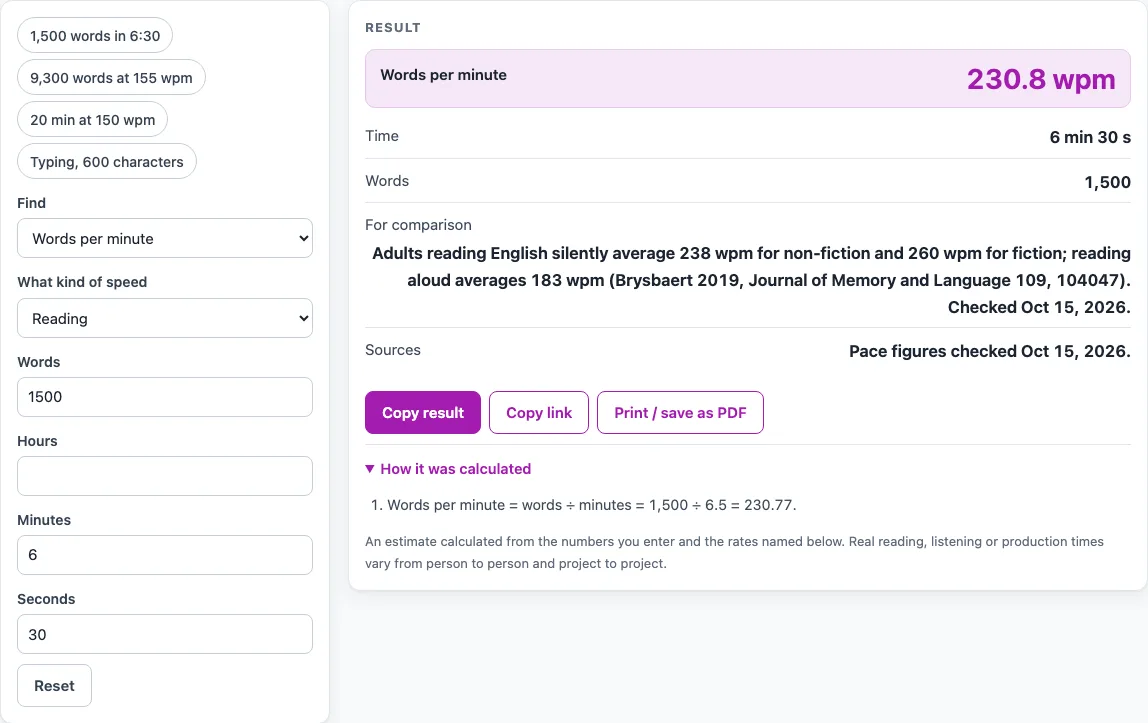
Choose one of three “Find” modes, then pick a kind under “What kind of speed”: reading, speaking, writing or typing. The kind only selects a context line about published rates. When you find words per minute for typing, you can also enter uncorrected errors to get a net speed. Four presets fill in common examples so you can see how the results look.
How to use the Words Per Minute Calculator
- Under “What kind of speed”, pick Reading, Speaking, Writing or Typing. For reading, speaking and writing, the arithmetic is identical. The kind only changes the context line shown with your result.
- Under “Find”, choose what you want to work out: “Words per minute”, “Time needed” or “Number of words”.
- For words per minute, enter the number of words, then enter the time using the hours, minutes and seconds fields. Any field can be left blank, but the total time must be above zero.
- For typing in the words per minute mode, enter “Characters typed (with spaces)”, with punctuation included. You can also enter “Uncorrected errors”. Gross and net speed both appear in the result.
- For time needed, enter the number of words and your words per minute. The result shows the time as “h min s” and as h:mm:ss.
- For number of words, enter your words per minute and the number of minutes.
- Read the result and any warning. A warning appears if a non-typing speed is over 1000 wpm, a typing speed is over 400 wpm, errors are more than characters typed, or net speed would fall below zero.
The presets are “1,500 words in 6:30”, “9,300 words at 155 wpm”, “20 min at 150 wpm” and “Typing, 600 characters”. Select one to see a worked case, then change the numbers to match your own.
How do you calculate words per minute?
Words per minute is the number of words divided by the number of minutes. Convert the time to minutes first. For 1,500 words in 6 minutes 30 seconds (390 seconds), 6.5 minutes gives 1,500 ÷ 6.5 = 230.77 wpm.
The same formula can be rearranged. Time needed is words ÷ wpm, and number of words is wpm × minutes. For example, 9,300 words at 155 wpm is 60 minutes, or 1 h 0 min 0 s.
Published figures give context for the result. Brysbaert (2019) reports that adults reading English silently average 238 wpm for non-fiction and 260 wpm for fiction, and 183 wpm when reading aloud. For speaking, the same source puts audiobooks at 140 to 180 wpm. ACX says most performers narrate about 9,300 words per hour, which is 155 wpm. No public source for a writing speed was read, so the tool shows no writing benchmark.
How is typing speed in words per minute worked out?
Typing speed uses a convention of five characters per word, based on Arif and Stuerzlinger (2009), as cited on Wikipedia. Gross wpm is characters ÷ 5 ÷ minutes. Net wpm subtracts the error rate, which is errors ÷ minutes, from gross wpm.
The net formula above is the definition on one vendor’s typing-test help page. Other typing tests count errors differently, so your net score may not match another test. If errors outweigh speed, net speed is shown as 0 with a warning.
For example, 600 characters typed in 2 minutes is 600 ÷ 5 = 120 words, so gross speed is 60 wpm. With 6 errors over 2 minutes, that is 3 errors per minute, and net speed is 60 − 3 = 57 wpm.
Sources (checked 15 October 2026): doi.org · help.acx.com · en.wikipedia.org · help.bryq.com
Worked examples
| Input | Result |
|---|---|
| 1,500 words in 6 min 30 s | 230.77 words per minute |
| 9,300 words at 155 wpm | 1 h 0 min 0 s (1:00:00) |
| 150 wpm for 20 min 0 s | 3,000 words |
| 120 words in 2 min 0 s | 57 words per minute |
| 1,000 words in 45 min 0 s | 22.22 words per minute |
Calculated by the tool above; open it with the same values to see each step.
Frequently asked questions
Is this words per minute calculator free to use?
Yes. It is free, requires no sign-up, and runs in your browser. The numbers you enter are not uploaded.
Does the calculator time me?
No. It is a calculator, not a test. Enter the time you measured yourself using the hours, minutes and seconds fields.
Why does my typing result show a net speed of 0?
Net speed is shown as 0 with a warning when the errors you entered, per minute, outweigh your gross speed. Check that the error count and the minutes are correct.
Why is my net wpm different from another typing test?
Typing tests count errors differently, and the net formula used here is the definition from one vendor’s help page. Compare results only with tests that use the same rule.
What reading speed is typical?
The tool does not rate your speed. Brysbaert (2019) reports adults average 238 wpm reading non-fiction silently, 260 wpm for fiction and 183 wpm reading aloud.
Why did I get a warning about a very high speed?
The tool warns above 1000 wpm for reading, speaking and writing, and above 400 wpm for typing. If you see one, check that the time and the word count were entered in the right units.
Related tools
- Audiobook Length Calculator: Use it to estimate how long an audiobook will run from its word count and a narration speed.
- Audiobook Speed Calculator: Use it to work out the speed you need to hit a target audiobook length.
- Reading Speed Test: Use it to measure your own reading speed rather than calculate it from numbers.
- Reading Time Calculator: Use it to estimate how long a text takes to read.
- Speech Time Calculator: Use it to estimate how long a speech or talk will last.